
feathers-import-export
feathers-import-export provides convenient methods to import/export to/from Feathers services.
feathers-import-export has been specially designed to process large volumes of data and to overcome data transfer problems during import and export, it relies on the capabilities of the S3 API.
WARNING
Consequently, using this library requires access to a storage service compatible with the S3 API.
NOTE
To deal with the objects in the stores, feathers-import-export relies on the feathers-s3 library. It is highly recommended to read a little more about this library upfront.
Principle
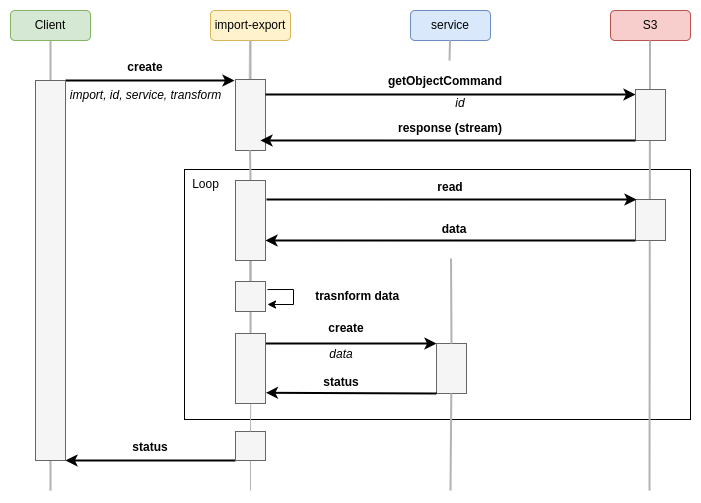
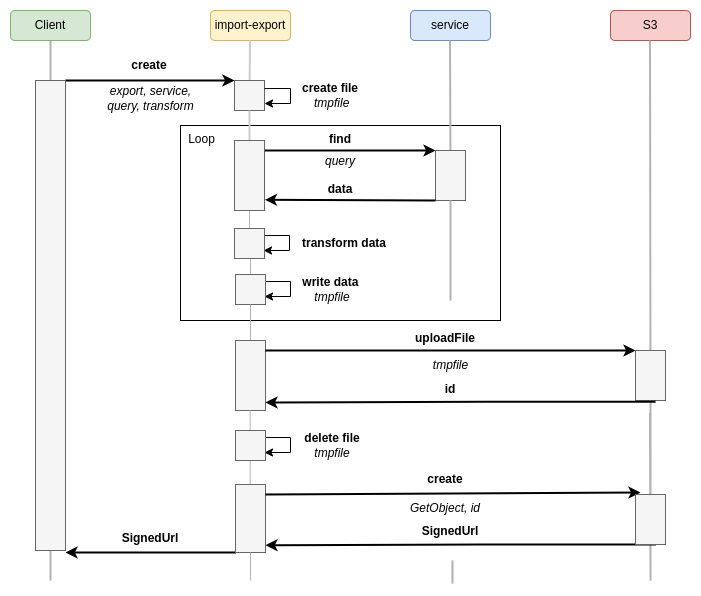
The following sections illustrate the different processes implemented by feathers-import-export:
Import
Export
Installation
Install with your preferred package manager:
pnpm add @kalisio/feathers-import-exportnpm install @kalisio/feathers-import-exportyarn add @kalisio/feathers-import-exportConfiguration
Assuming you have setup a Feathers app:
// Import Feathers stufff
import { Service } from '@kalisio/feathers-import-export'

// Setup Feathers app
const options = {
  s3Options: {
    s3Client: {
      credentials: {
        accessKeyId: process.env.S3_ACCESS_KEY_ID,
        secretAccessKey: process.env.S3_SECRET_ACCESS_KEY
      },
      endpoint: process.env.S3_ENDPOINT,
      region: process.env.S3_REGION,
      signatureVersion: 'v4'
    },
    bucket: process.env.S3_BUCKET,
    allowedServicePaths: 'path/to/my/service' // a regular expression, or an array, used to validate the path to the requested service
    prefix: 'tmp' // a folder used to store imported/exporter files
  },
  app,
  workingDir: process.env.TMP_DIR,
}

app.use('import-export', new Service(options))
The s3Options options are described in feathers-s3
Examples
Import data from a file
Import data from a data.csv file into the my-service service:
const response = await app.service('import-export').create({
  method: 'import',
  id: 'key/to/the/file/in/the/bucket'   // file key into the bucket
  servicePath: 'path/to/service'        // path to the service where to import the data
})
NOTE
This method assumes that you have already uploaded the file.
Export data to a file
Export data from the my-service service into the data.csv file:
const response = await app.service('import-export').create({
  method: 'export',
  servicePath: 'path/to/my-service',
  filename: 'data.csv',
  format: 'csv'
})