
kapture
Capture Kano Snapshots as a Service
Overview
Capture App Snapshots as a Service
kapture is a lightweight service that let you take screenshots.
kapture relies on Puppeteer and Express
Installation
Install with your preferred package manager:
pnpm add @kalisio/service-kapturenpm install @kalisio/service-kaptureyarn add @kalisio/service-kaptureAPI
capture (POST)
Request a capture with the following query parameters.
The body of the request must conform a JSON object with the following properties:
| Property | Description | Defaults` |
|---|---|---|
layers | specifies the layers to display | [] |
time | specifies the time to display | - |
bbox | specifies the bounding box of the zone to display | - |
path | specifies the frontend URL path to the activity | /#/home/map for Kano |
size | specifies the capture size | { "width": 1024, "height": 768 } |
delay | specified the waiting delay before capturing the screenshot (in milliseconds) | 1000 |
networkIdleTimeout | specified the maximum time to wait for network idle capturing the screenshot (in milliseconds) | 90000 |
type | Declares the input data type | - |
content | Raw content for generic imports | - |
parameters | Additional query parameters to be sent to the target activity | - |
layout | overrides application layout configuration, will do nothing if empty | panes: { left: { opener: false, visible: false }, ... }, fab: { visible: false } |
The layers property must conform the following JSON schema:
"layers": {
  "type" : "array",
  "items": {
    "type": "string"
  }
}
The items must conform the kano formalism, i.e. Layers.MY_LAYER. In addition and for backward compatibility, you can specify the layer name using kebab case: layers-my-layer, with or without the layers- prefix.
The path property must conform the following JSON schema:
"path": {
  "type": "string",
  "default": ""
}
The size property must conform the following JSON schema:
"size": {
  "type": "object",
  "properties": {
    "width": {
      "type": "integer",
      "default": 1024
    },
    "height": {
      "type": "integer",
      "default": 768
    }
}
The delay property must conform the following JSON schema:
"delay": {
  "type": "number",
  "default": "2000"
}
When type and content are provided, they allow rendering the data as an overlay.
typeproperty declares the input data format (e.g.kml,geojson, etc.)contentcontains the raw data as a string
Example:
{
  "type": "kml",
  "content": "<kml>...</kml>"
}
In addition the body can conform a GeoJSON object. The described features will be rendered as an overlay.
Here is a complete example:
{
  "layers": ["Layers.IMAGERY"],
  "type": "FeatureCollection",
  "features": [
    {
      "type": "Feature",
      "geometry": {
        "type": "Point",
        "coordinates": [3, 42.5]
      },
      "properties": { "fill-color": "#AAAAAA" }
    },
    {
      "type": "Feature",
      "geometry": {
        "type": "LineString",
        "coordinates": [ [3, 42], [4, 43], [5,42], [6, 43]]
      },
      "properties": { "fill-color": "#AAAAAA" }
    },
    {
      "type": "Feature",
      "geometry": {
        "type": "Polygon",
        "coordinates": [ [ [0, 42], [1, 42], [1, 43], [0, 43], [0, 42] ] ]
      },
      "properties": { "fill-color": "#AAAAAA" }
    }
  ]
}
And the response looks like:
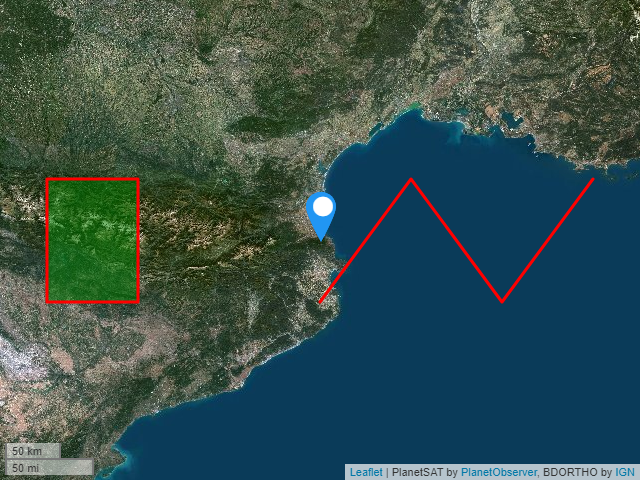
healthcheck (GET)
Check for the health of the service. It answers { "isRunning": true } as soon as the server accepts connections — it reports neither a name nor a version, unlike the other services of the ekosystem.
API reference
The full request/response schema — every body property, the response codes and the error payloads — is documented on the API reference page. That spec declares no server, so pick your own instance URL in the server selector before sending a request from that page.
Configuring
Here are the environment variables you can use to customize the service:
| Variable | Description | Defaults |
|---|---|---|
APP_NAME | The app name | - |
APP_URL | The app url | - |
APP_JWT | The app token to get connected | * |
BODY_LIMIT | The size limit of the request body | 100kb |
PORT | The port to be used when exposing the service | 3000 |
DELAY | The waiting delay before capturing the screen (in milliseconds) | 2000 |
PAGE_SETUP_DELAY | The waiting delay after navigation, letting the activity set itself up (in milliseconds) | 2000 |
UPLOAD_FILE_DELAY | The waiting delay after uploading the imported data (in milliseconds) | 2000 |
NETWORK_IDLE_TIMEOUT | Maximum time to wait for the network idle (in milliseconds) | 100000 |
DEBUG | The namespaces to enable debug output. Set it to kapture:* to enable full debug output. |
Building
Manual build
You can build the image with the following command:
docker build -t <your-image-name> .Automatic build using Travis CI
This project is configured to use Travis to build and push the image on the Kalisio's Docker Hub. The built image is tagged using the version property in the package.json file.
To enable Travis to do the job, you must define the following variable in the corresponding Travis project:
| Variable | Description |
|---|---|
DOCKER_USER | your username |
DOCKER_PASSWORD | your password |
Deploying
This image is designed to be deployed using the Kargo project.
Check out the compose file to have an overview on how the container is deployed.
Testing
To test the service you need to set the following environment variables:
| Variable | Description | Defaults |
|---|---|---|
KAPTURE_URL | The Kapture url. | http://localhost:3000 |
KAPTURE_JWT | The Kapture bearen token to pass a gateway if needed. It is set using Auhtorization header. | - |
To run the tests, use the subcommand test:
yarn test